How to get real-time customer feedback for your business


Customer expectations move fast. A growing share of consumers now expect a business to respond within a day of leaving a review, and most expect to hear back within a week. You cannot move that quickly if you only find out how customers feel weeks later.
Real-time customer feedback solves that. Instead of waiting on a monthly survey, you hear from people while they are still with you, or right after they leave, when you can still do something about it. This guide shows how to set up real-time customer feedback for a local business: where to capture it, how to make it take seconds, and how to get alerted the moment it arrives. Everything in this guide can run on a free plan, and setup takes about ten minutes.
What counts as real-time customer feedback?
Real-time customer feedback is feedback you receive at or near the moment of service, and that reaches you right away. Both parts matter. Feedback collected on the spot is fresh and accurate. Feedback that lands in your inbox instantly is feedback you can act on while it still counts. That is different from a quarterly survey or a monthly report, which tells you how last month went after the chance to fix anything has passed. Real-time feedback is about now: the customer who just sat in your chair, ate at your table, or finished an appointment this afternoon.
Why real-time beats the monthly survey
You can fix problems the same day. A quiet complaint you hear within minutes is a problem you can still solve. The same complaint a month later is a customer you already lost.
You capture praise while it is fresh. People write better, more specific reviews right after a good experience than days later.
It reflects reality, not a memory. Recent feedback shows what your business is actually like today, not how it felt last quarter.
It helps you meet rising response expectations. Customers increasingly expect quick replies, and you can only respond quickly if you hear quickly.
How to set up real-time customer feedback
You do not need a complicated system. Five steps cover it.
Put a feedback point where service happens. A QR code on the table, counter, receipt, or chair lets a customer share feedback before they even leave. You can make one with the free QuickFeedback QR code generator.
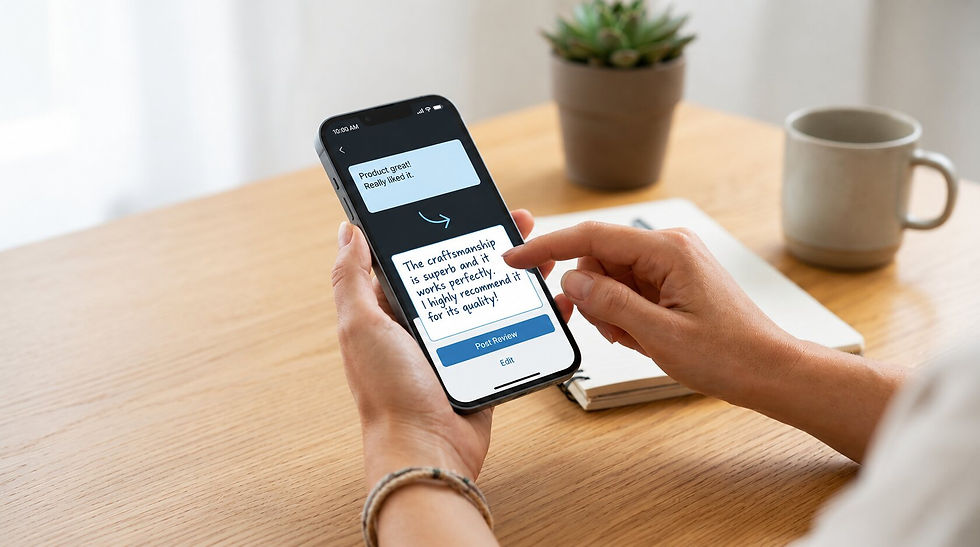
Make it take seconds. The faster it is, the more feedback you get in real time. A good flow is a single tap, thumbs up or down, followed by a short box where the customer types a few words. On paid plans, Write with AI turns those few words into a clear sentence the customer can edit, so writing is never the reason they stop.
Get alerted the moment feedback arrives. This is the part that makes it real-time. QuickFeedback emails you the instant a customer submits feedback, so a problem reaches you in minutes, not at month end. Instant alerts are included on every plan, including the free one.
Automate it for appointments. If you run on bookings, Automated Feedback sends a feedback request by email automatically after a completed appointment, using the same private-first flow. You capture feedback right after every visit without having to remember to ask. The free plan includes up to 30 automated requests a month.
Make it easy to leave a public review while the experience is still fresh. After a customer submits feedback, the final screen offers a copy box with their polished text and a button to leave a public review. Every customer reaches the same public review option at the same prominence, regardless of whether their feedback was positive or negative.
Review Link Rotation lets you point that button across up to three platforms so your reviews do not all pile up in one place.
What to do the moment feedback lands
Real-time feedback is only useful if you act on it in real time. A simple routine:
Respond fast. A quick, personal reply matters, and customers increasingly expect one. If you are short on time, the free Google Review Reply Generator drafts a response you can adjust and send.
Fix issues the same day. If something went wrong, reach out while the visit is still fresh. A fast fix often turns a frustrated customer into a loyal one.
Act on patterns. If three people mention the same thing in a week, that is your next improvement.
The bottom line
Real-time customer feedback comes down to two things: capture it where service happens, and get told the moment it arrives. Do both, and you stop guessing how customers feel and start hearing it while you can still act.
QuickFeedback puts the whole loop in one place, from the QR code to the instant alert to the finished review. The free plan covers everything in this guide: one QR code, up to 30 feedback submissions a month, instant alerts, and automated requests after appointments. Start free. No credit card required, and every paid plan includes a free custom QR sign.