

What Features to Look For in Feedback Software

Updated: Aug 8
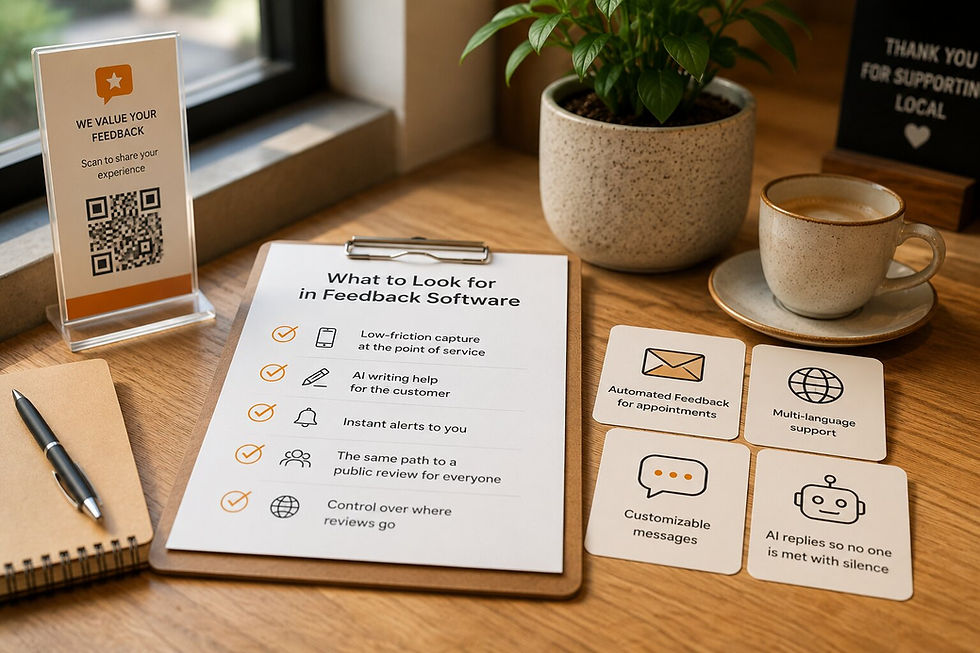
Most feedback tools look the same on a pricing page. They all promise more reviews and happier customers. The differences that actually matter show up later, once you are using one every day.
This is a practical guide to the features worth looking for in customer feedback software, why each one matters, and what good looks like. Use it to compare tools on what changes your results, not on the length of the feature list.
Start with the job, not the feature list
Before you compare features, get clear on the job. For most local businesses, feedback software has one purpose: capture honest feedback from real customers, and make it easy for customers to share a public review, quickly and without friction.
Judge every feature against that. A long list of settings you will never touch is worth less than one feature that gets you more honest feedback and more public reviews. Keep the job in mind and the right tool gets obvious.
The Core Features to Look For in Feedback Software
These are the essentials. If a tool is missing one of them, keep looking.
Feature | Why it matters | What good looks like |
Low-friction capture at the point of service | Feedback collected on the spot is fresh and far more common than feedback chased by email weeks later | A QR code or short link that works on any phone, with no app to download and no login for the customer |
AI writing help for the customer (available on paid plans) | Not knowing what to write is the main reason people abandon a review | The customer types a few keywords and the tool turns them into a clear draft they can edit, so the words stay theirs. |
Instant alerts to you | Feedback only helps if you see it while you can still act | An email the moment a customer submits feedback, not a weekly digest |
The same path to a public review for everyone | Trust and platform rules both depend on treating customers equally | Every customer reaches the same public review option at the same prominence, whatever their experience |
Control over where reviews go | You may want Google plus one or two other platforms | The tool can route customers across more than one review platform, not just a single hardcoded link |
QuickFeedback covers all five. Capture runs off a free QR code generator. Write with AI (available on paid plans) handles the drafting, alerts arrive by email the moment feedback lands, the public review option is identical for every customer, and Review Link Rotation points customers across up to three platforms.
Features that separate good from average
Once the basics are covered, these are the features that make a tool genuinely pleasant to run.
Automation for appointment businesses. If you work by booking, look for feedback that goes out on its own. Automated Feedback sends a request by email automatically after a completed appointment, so you capture feedback after every visit without remembering to ask.
Editable, multi-language messages. Your prompts should sound like you and reach customers in their language. Customizable Messages let you edit the wording for both positive and negative responses, and the flow supports multiple languages.
AI replies so no one is met with silence. A tool that drafts a tailored response saves you time and shows customers you are listening. You can see how this works with the free Google Review Reply Generator.
What to check before you pay
Features matter, but so does how the tool treats you as a customer.
A free plan. You should be able to use the product properly before paying. QuickFeedback offers a free plan with no credit card required.
Pricing you can actually read. Clear tiers beat a quote-on-request wall.
Your data stays yours. Check that you can export your feedback and are not locked in.
Setup you can do yourself. You should be able to get running in an afternoon without a developer.
A quick checklist
When you are comparing tools, run each one through this list:
Captures feedback at the point of service, on any phone
Helps the customer write, in their own words
Alerts you the instant feedback arrives
Sends every customer to the same public review option
Routes reviews across the platforms you choose
Automates requests for appointment-based visits
Lets you edit messages and supports your customers' languages
Offers a free plan and clear pricing
The bottom line
The right feedback software is not the one with the longest feature list. It is the one that quietly does the job: more honest feedback, more public reviews, less effort from you.
QuickFeedback was built around exactly those essentials, from capture to alert to review. Start with the free plan. No credit card required, and every paid plan includes a free custom QR sign.


